Phishing: How to Spot a Scam Email Before It Costs You Thousands
 Declan Mahjoub
What modern phishing actually looks like, and the team habits that stop it cold.
Phishing is still the most common way small businesses get breached, and the math is brutal. One employee. One click. One typed password into a fake login. From there, attackers can be in your email, draining your bank, sending fraud to your customers in your name, or sitting quietly for two weeks waiting to launch ransomware.
The good thing is, most of these attempts are catchable if you know what you're looking for. This post breaks down what modern phishing actually looks like, the red flags that still work in 2026, the new tricks that AI brought to the party, and the two team habits that defang almost all of it.
What phishing actually is
Phishing is social engineering with email as the delivery vehicle. The attacker isn't really trying to break into your computer. They're trying to get you to do something you'd never normally do, by impersonating someone you trust or pressuring you into urgency. Click a link. Open an attachment. Reply with sensitive info. That's the whole game.
There are some variants worth knowing by name. Spear-phishing is a targeted attack on one specific person. Whaling is spear-phishing aimed at executives. Smishing comes by text message. Vishing comes by phone or voicemail. The mechanics vary slightly. The play is identical: fake trust, urgency, requested action.
Five red flags that still work
Even with AI making phishing more polished, these five tells haven't gone away. Train your team to look for them.
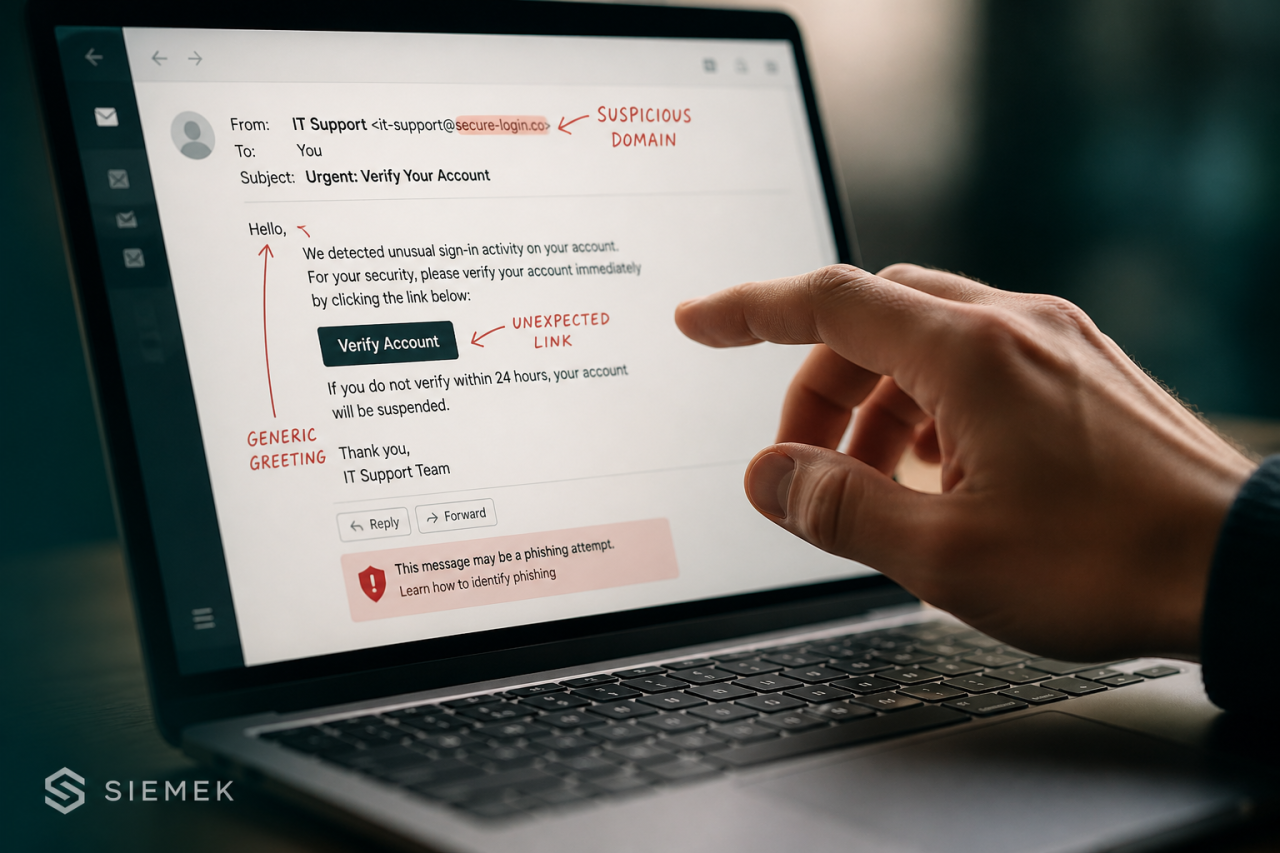
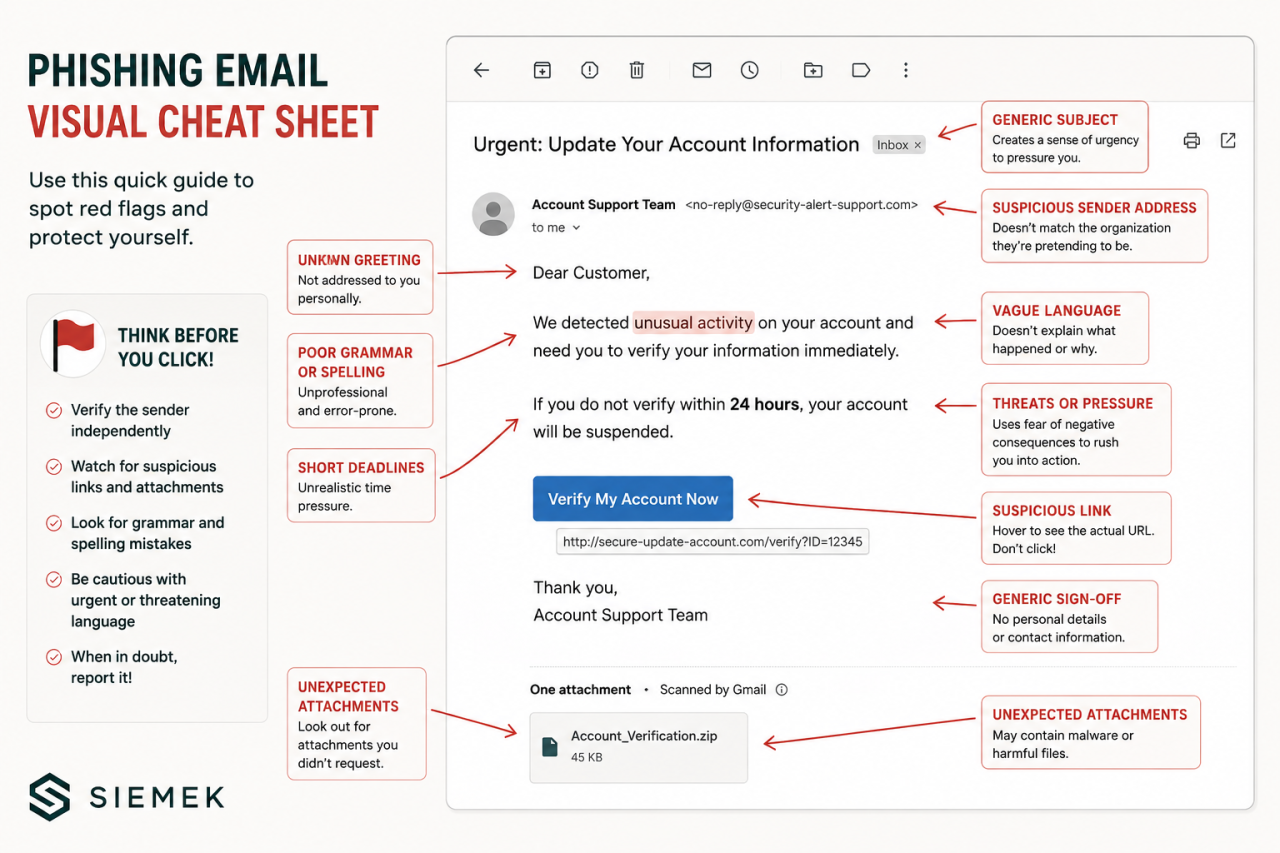
Mismatched sender details. The display name says "Microsoft 365 Security" but the actual address is something like notice@office365-secure-update[.]com. Always check the real email address, not just the friendly name.
Manufactured urgency or fear. "Your account will be suspended in 24 hours." "Final notice." "Immediate action required." Real businesses almost never write like this. Criminals love it because pressure shuts off careful thinking.
Links that don't match. Hover over a link before you click. If the URL underneath doesn't match what the email is claiming, that's the moment to stop.
Unexpected attachments, especially file types like .zip, .iso, .html, or any Office document asking you to enable macros. Treat these as guilty until proven innocent.
Requests that bypass normal process. Wire-transfer changes by email. Gift card requests from a CEO. Urgent invoices from a vendor you've never heard of. Anything that asks you to skip your usual approval steps deserves a phone call to a known number.
What changed in the AI era
The classic "watch for typos and bad grammar" advice has lost most of its power. Phishing emails are now drafted by the same large language models that power professional writing tools. Spelling and grammar are no longer reliable tells.
What changed even more is personalization. AI scrapes your team's LinkedIn profiles, mimics your CEO's writing style, and can hold a real-time conversation with the target. Voice cloning has joined the toolkit too. We've seen "the boss called and said wire it now" attacks against finance staff hit close to home for a few of our clients in the last year.
The takeaway: stop relying on "this email looks weird" instincts. Lean harder on process. MFA. Out-of-band verification for any money or credentials request. A safe word for the executive team. Process beats vibes when it comes to AI-era phishing.
The two team habits that stop most phishing
Habit one: pause before you click on anything that triggers an emotion. Urgency, fear, curiosity, authority pressure. Those four levers are exactly what attackers pull. When your team feels rushed or anxious about an email, that's the cue to slow down, not speed up. Make this an explicit norm. "If it feels urgent, that's the signal to be slower, not faster."
Habit two: verify out-of-band for anything involving money, credentials, or sensitive data. Out-of-band means: not by replying to the email. Pick up the phone. Use Slack. Walk down the hall. Use a number you already had on file, not the one in the suspicious email. If you do this religiously, you'll block almost every BEC attempt that ever lands in your inbox.
What to do when someone clicks anyway
Assume someone will eventually click. That's not pessimism, that's planning. The goal isn't perfection, it's a fast, blameless response.
The moment a click happens, change the password and end all active sessions for the affected account. Force sign-out everywhere. Run a full endpoint scan on the device. Check the mailbox for any new forwarding rules the attacker may have added (this is the most-missed step, and it's the mechanism behind most BEC attacks). Pull up recent sign-in logs. Loop in your IT or security partner.
What you do in the first thirty minutes after a click decides whether this stays a near-miss or becomes a multi-week incident. So don't punish people for reporting fast. Reward them. The CEO who admits at the all-hands meeting that they almost clicked something does more for company security than any training video.
One more underrated control: the 'reply-to' check
When you click reply on a phishing email, the reply-to address often goes to a different domain than the sender. Most email clients show this if you look. We tell clients to make a habit of glancing at where their reply is going whenever an email is asking them to take action. It takes one second and catches a category of attack that nothing else catches. It's free. It works. And almost nobody does it.
If you read all that and thought "okay, but where do I actually start?" reach out. We do quick, no-pressure reviews for small businesses every week. Tell us where you are, we'll tell you the two or three things worth doing first, and you can take it from there. Visit siemekconsulting.com or drop us a note. We answer our own emails.
Categories: : Cybersecurity